
Infrastructure as Code With Terraform: Complete Guide | 2026
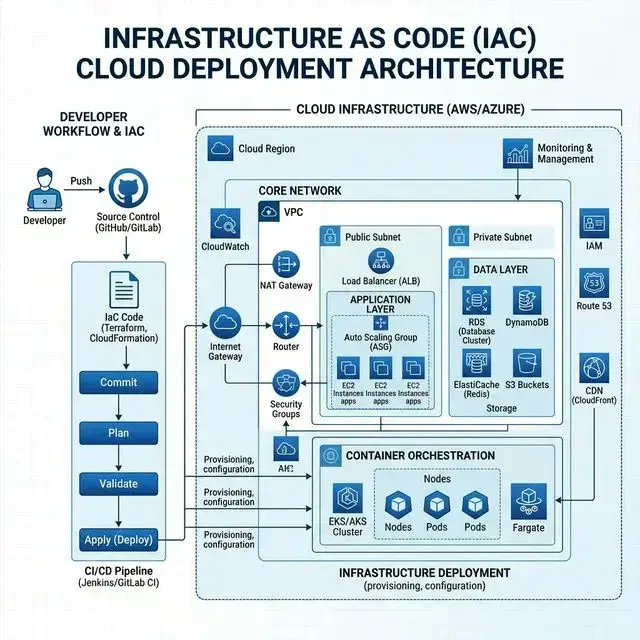
Infrastructure as Code With Terraform: Complete Guide
Managing cloud infrastructure through manual point-and-click cloud web consoles leads to configuration drift, human error, and slow deployments. Infrastructure as Code (IaC) replaces manual console management by allowing engineers to define entire cloud architectures using declarative code files.
Among modern IaC tools, HashiCorp Terraform is the industry standard for multi-cloud infrastructure provisioning across AWS, Microsoft Azure, Google Cloud Platform (GCP), and Kubernetes.
What Is Infrastructure as Code?
Infrastructure as Code is the process of provisioning and managing cloud compute, networking, storage, and security resources using machine-readable definition files rather than manual physical hardware configuration or web UI clicks.
By storing infrastructure definitions in version control system (Git), engineering teams gain code review, automated testing, instant environment replication, and full auditability.
Why Choose Terraform for Infrastructure as Code?
- Declarative Syntax: Define what infrastructure you want, and Terraform calculates how to build it.
- Multi-Cloud Provider Ecosystem: Single unified workflow for AWS, Azure, GCP, Cloudflare, and Kubernetes.
- State Management: Maintains an explicit state file (
terraform.tfstate) mapping real-world cloud resources to configuration files. - Modular Architecture: Enables reusable, standardized infrastructure modules across teams.
Terraform Core Concepts & Architecture
Terraform uses HashiCorp Configuration Language (HCL) to construct declarative resource blocks:
Providers (AWS/Azure/GCP) → Resources (VPC, EC2, S3) → State File (tfstate) → Cloud Execution API
Terraform Workflow
A standard Terraform operational workflow follows four key execution commands:
terraform init: Initializes the working directory and downloads necessary cloud provider plugins.terraform plan: Previews the execution plan, displaying resource additions, modifications, or deletions without touching cloud infrastructure.terraform apply: Executes the planned changes against target cloud provider APIs safely.terraform destroy: Safely tears down all managed infrastructure resources when no longer needed.
Terraform State Management
The state file (terraform.tfstate) is critical to Terraform operation because it records metadata mapping code definitions to real-world cloud resource IDs.
- Remote State Storage: Store state files in encrypted remote backends (AWS S3, Azure Blob, Terraform Cloud) rather than local disks.
- State Locking: Use locking mechanisms (DynamoDB for AWS S3) to prevent concurrent executions from corrupting state files.
- Sensitive Data Protection: Ensure state backends are encrypted at rest, as state files contain raw resource outputs and connection strings.
Terraform Modules & Reusability
Terraform modules allow teams to package multiple cloud resources into standardized, reusable templates (e.g., VPC module, EKS cluster module). Using modules enforces organizational compliance, accelerates environment setup, and prevents code duplication.
Automating Terraform in CI/CD
Automate Terraform plan and apply commands inside CI/CD pipelines (GitHub Actions, GitLab CI, Atlantis) to enforce peer code reviews before infrastructure changes are applied to production.
To see how IaC connects to broader cloud automation, read our guide on Cloud Automation Solutions for Modern Businesses.
Terraform Best Practices
- Structure code into distinct, reusable Terraform modules.
- Use remote backends with state locking enabled.
- Run automated IaC security linters (Checkov, tfsec) in CI/CD pipelines.
- Pin provider and Terraform version constraints strictly.
- Never hardcode secrets in
.tffiles; use environment variables or secret managers.
Common Terraform Pitfalls
- Making manual console edits outside Terraform, causing state drift.
- Storing state files locally or checking state into Git.
- Creating giant, monolithic state files instead of splitting infrastructure into modular layers.
Frequently Asked Questions
What is Infrastructure as Code with Terraform?
Infrastructure as Code with Terraform allows developers to define, provision, and manage cloud infrastructure across AWS, Azure, and GCP using version-controlled code files.
What is the difference between Terraform and Ansible?
Terraform is primarily an infrastructure provisioning tool designed to spin up cloud resources (servers, databases, networks). Ansible is primarily a configuration management tool designed to configure software inside servers.
Why is the Terraform state file important?
The state file tracks the relationship between your Terraform configuration code and the actual real-world resources in your cloud provider.
Master Terraform & Cloud Infrastructure
Elevate your cloud automation capabilities with our hands-on Terraform & Infrastructure as Code Course or explore our All DevOps Training Courses. For enterprise cloud provisioning and infrastructure management, check our Managed DevOps & Cloud Services and AI & Cloud Consulting Services.
About NexGenium DevOps Experts
Infrastructure Automation & IaC SpecialistsTerraform, Ansible, and Multi-Cloud automation architects helping engineering teams eliminate configuration drift and scale cloud platforms.