Docker & Kubernetes Architecture Explained: Complete Guide for Modern Infrastructure
Docker & Kubernetes Architecture Explained: Complete Guide for Modern Infrastructure
Modern applications require scalability, reliability, portability, and faster deployments. This is where Docker and Kubernetes have transformed the way software is built, deployed, and managed.
Whether you're a student, DevOps engineer, cloud professional, or system administrator, understanding Docker and Kubernetes architecture is essential for working with modern cloud-native applications.
In this guide, we'll break down Docker and Kubernetes architecture, explain how they work together, and show why they have become the industry standard for application deployment.
What is Docker?
Docker is an open-source containerization platform that allows developers to package applications along with all dependencies into lightweight, portable containers.
Unlike traditional virtual machines, containers share the host operating system kernel, making them faster, smaller, and more efficient.
Benefits of Docker
Consistent environments
Faster application deployment
Resource efficiency
Simplified application packaging
Easy scalability
Better DevOps workflows
Docker follows the principle:
Build Once, Run Anywhere
This allows applications to run consistently across development, testing, staging, and production environments.
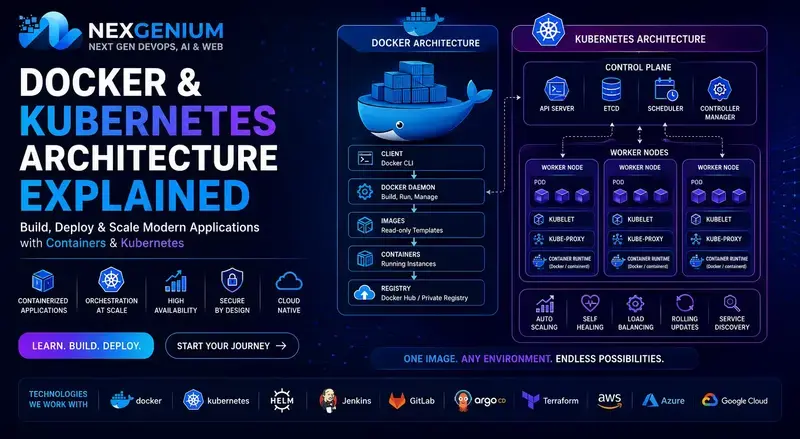
Docker Architecture
Docker consists of several core components.
Docker Client
The Docker Client is where users execute commands such as:
docker build
docker run
docker pull
docker push
The client communicates with the Docker Daemon.
Docker Daemon
The Docker Daemon is responsible for:
Building images
Managing containers
Managing networks
Managing volumes
It runs continuously on the host machine.
Docker Images
Docker Images are read-only templates used to create containers.
Images contain:
Application code
Libraries
Runtime dependencies
System tools
Docker Containers
Containers are running instances of Docker images.
They provide:
Isolation
Portability
Fast startup
Consistent execution
Docker Registry
Docker images are stored in registries such as:
Docker Hub
AWS ECR
Google Container Registry
Azure Container Registry
What is Kubernetes?
Kubernetes (K8s) is an open-source container orchestration platform designed to automate deployment, scaling, and management of containerized applications.
While Docker manages containers, Kubernetes manages containers at scale.
Large organizations use Kubernetes to handle thousands of containers across multiple servers.
Why Kubernetes?
Managing hundreds of containers manually becomes difficult.
Kubernetes solves challenges such as:
Auto Scaling
Load Balancing
Self-Healing
Service Discovery
High Availability
Rolling Updates
Kubernetes Architecture
Kubernetes architecture is divided into two major sections:
Control Plane
Worker Nodes
Control Plane Components
The Control Plane acts as the brain of the Kubernetes cluster.
API Server
The API Server receives requests from users and applications.
Responsibilities include:
Authentication
Authorization
Cluster management
Resource creation
ETCD
ETCD is the cluster database.
It stores:
Cluster state
Configuration data
Secrets
Service information
Scheduler
The Scheduler decides which worker node should run a specific pod.
It considers:
Resource availability
CPU usage
Memory usage
Policies
Controller Manager
The Controller Manager ensures the desired state of the cluster matches the current state.
Examples:
Restart failed containers
Create missing pods
Scale applications
Worker Node Components
Worker nodes execute application workloads.
Kubelet
Kubelet communicates with the Control Plane and ensures containers are running correctly.
Kube Proxy
Kube Proxy handles networking and load balancing across services.
Container Runtime
The Container Runtime is responsible for running containers.
Examples:
Docker
Containerd
CRI-O
Understanding Pods
Pods are the smallest deployable units in Kubernetes.
A Pod can contain:
One container
Multiple containers
Applications are deployed inside Pods.
Services in Kubernetes
Services provide stable communication between Pods.
Common Service Types:
ClusterIP
NodePort
LoadBalancer
ExternalName
Services ensure applications remain accessible even when Pods restart.
Deployments
Deployments manage application releases.
Features include:
Rolling updates
Rollbacks
Replica management
Automated scaling
Deployments help maintain application availability during upgrades.
How Docker and Kubernetes Work Together
The workflow looks like this:
Step 1
Develop application code
Step 2
Build Docker Image
Step 3
Push Image to Registry
Step 4
Deploy Image into Kubernetes Cluster
Step 5
Kubernetes manages Pods and Services
Step 6
Applications automatically scale and recover
This combination enables highly reliable cloud-native systems.
Docker & Kubernetes in DevOps
Docker and Kubernetes are critical components of modern DevOps pipelines.
Common integrations include:
Jenkins
GitHub Actions
GitLab CI/CD
ArgoCD
Terraform
This enables automated software delivery from development to production.
Real-World Use Cases
Organizations use Docker and Kubernetes for:
Microservices Architecture
Deploy multiple independent services efficiently.
Cloud-Native Applications
Build scalable applications on AWS, Azure, and GCP.
CI/CD Pipelines
Automate testing and deployments.
Multi-Cloud Deployments
Run applications across different cloud providers.
Career Opportunities
Learning Docker and Kubernetes opens opportunities such as:
DevOps Engineer
Cloud Engineer
Site Reliability Engineer (SRE)
Platform Engineer
Kubernetes Administrator
Infrastructure Engineer
These roles are among the highest-paying positions in modern IT.
Why Learn Docker & Kubernetes with NexGenium?
At NexGenium, we provide hands-on training focused on real-world deployment scenarios.
What You'll Learn
Docker Fundamentals
Kubernetes Administration
CI/CD Pipelines
Cloud Deployments
Monitoring & Logging
Infrastructure Automation
Training Benefits
Live Projects
Industry Mentorship
Cloud Labs
Resume Building
Interview Preparation
Our goal is to help students and professionals become industry-ready DevOps engineers.
Final Thoughts
Docker and Kubernetes have become essential technologies for modern software delivery and cloud infrastructure.
Docker simplifies application packaging, while Kubernetes provides powerful orchestration capabilities for large-scale deployments.
Together, they form the foundation of modern DevOps, cloud-native architecture, and scalable application platforms.
Organizations worldwide continue to adopt container technologies, making Docker and Kubernetes some of the most valuable skills for technology professionals in 2026 and beyond.
Ready to Master Docker & Kubernetes?
Join NexGenium's practical DevOps training program and gain real-world experience in containerization, orchestration, cloud deployments, and automation.
Build. Deploy. Scale. Succeed.
About Alena
Senior Solutions EngineersNexGenium technical practitioners providing production-grade engineering, cloud infrastructure solutions, and industry training.